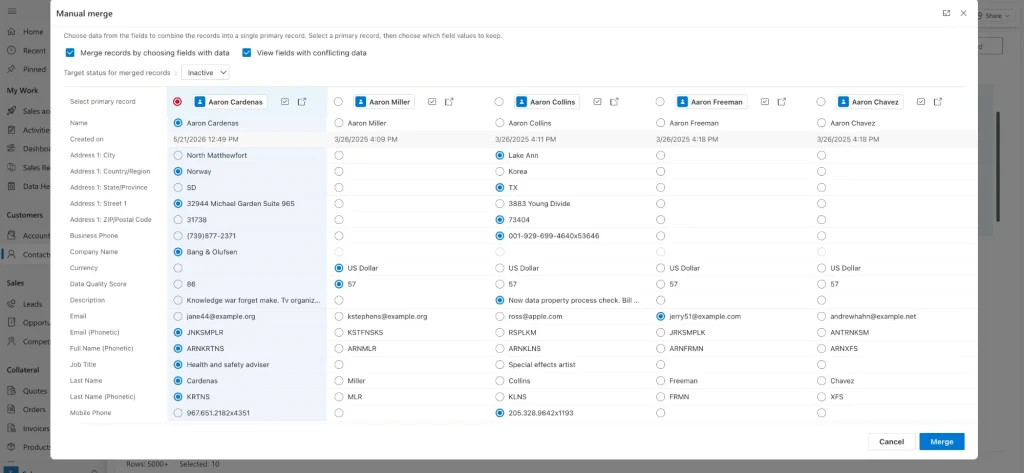
You merge two contacts in Dynamics 365, and a minute later you realise they were two different people. With the built-in merge, there is no way back. The second record is deactivated, its activities, cases and opportunities now sit on the first one, and the field values you overwrote are gone.
The Data Quality App can undo that merge. It is one of six things that are rare among data quality tools for Dynamics 365. This article explains each of them and ends with the questions to ask any vendor before you buy.
Why a merge in Dynamics 365 normally can’t be undone
When Dynamics 365 merges two records, it keeps one as the master and deactivates the other. Then it moves the related records (activities, notes, cases, opportunities, child contacts) from the merged record to the master and fills in or overwrites field values on the master.
You can reactivate the merged record afterwards, but that does not reverse the merge:
- The related records stay on the master.
- The old field values on the master are not restored.
- Nobody can see later what exactly the merge changed.
Most deduplication add-ons use the same merge, so they have the same limit. That is why many teams never dare to switch on automatic merging. One wrong match is permanent. Read more about how merging works in Dynamics 365.
1. Undo any merge, even a bulk merge
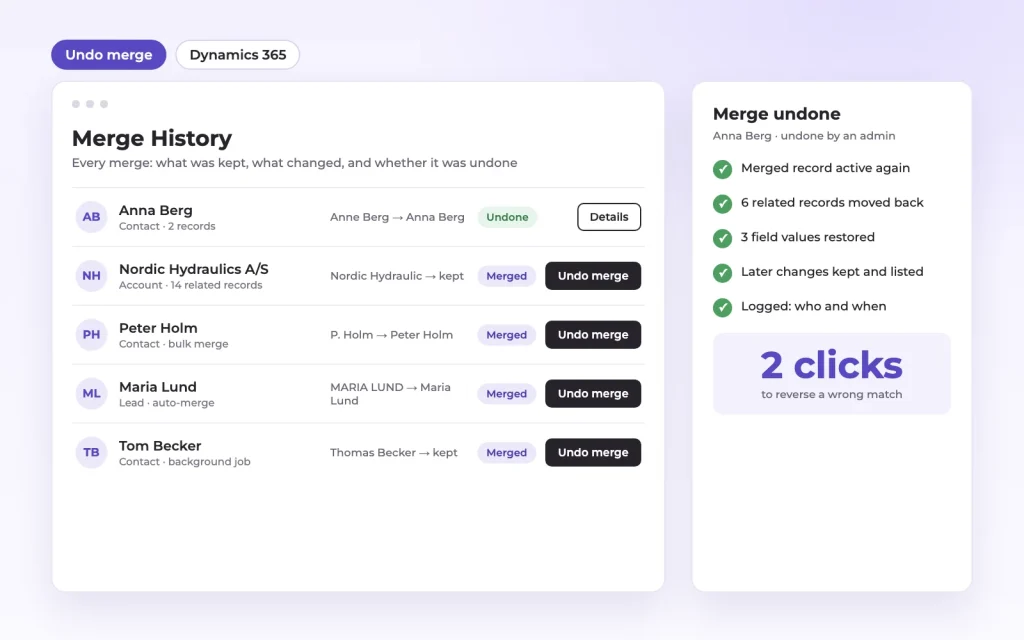
The Data Quality App records every merge it does in Merge History. That includes merges from a record, from a duplicate result, from a bulk or background merge, and from the AI assistant. For each merge you see:
- which record was kept and which was merged in;
- which columns changed on the kept record, with the old and new value;
- which related records were moved to the kept record.
When you undo a merge, the app reverses it:
- The merged record becomes active again, with the status it had before.
- Related records, activities, links and marketing list memberships go back to the merged record, unless someone has moved them again since.
- The column values the merge changed on the kept record are put back.
- Anything that was changed after the merge is left alone and listed in the undo report, so you never lose newer work.
- The merge stays in the history, marked Undone, with who undid it and when.
You can undo one merge, tick several, or undo every merge that matches a filter. One that cannot be undone does not stop the others. A large undo runs as a background job, so you can close the page and follow it on the Jobs page.
Admins stay in control. Only users with the app’s admin role can undo merges, and admins decide how many days the history is kept. For a very large clean-up you can switch the history off to save Dataverse storage. Those merges then cannot be undone, and the app tells you so before you start.
Why it matters: when every merge can be reversed, you can let the app merge strong matches automatically, clean up millions of records, and still fix a wrong match in two clicks.
2. A data quality score on every record
Built-in Dynamics 365 has no data quality score. In the Data Quality App, every record gets a score out of 100, calculated from your data quality rules. Errors count fully and warnings count partly.
On the record form, users see a short checklist of what is missing or wrong, split into errors and warnings, with a button that jumps to the field. People fix their data while they work, without opening a report. Admins see the same scores per table and over time on the data quality dashboard.
3. One score for the whole customer
A clean account record is not much use if its contacts have no email addresses and its open opportunities have no close date. Data Quality 360 gives one score for the whole customer: the account together with its contacts, cases and opportunities.
You see at a glance which related records pull the score down and can open them straight from the overview. The view can be exported to Excel for account managers or a data steward. We have not seen a customer-level score like this in other Dynamics 365 data quality tools.
4. AI agents check your data before they act
Copilot and other AI agents now create and update CRM records too. If an agent cannot see your duplicate rules, it creates the same customer twice, just faster than a person would.
The Data Quality App has its own MCP gateway. Through it, Copilot Studio and other agents can check for duplicates and run your data quality rules before they create or change a record. Security roles decide what an agent may read, create or delete, so it never gets more rights than you give it.
5. Everything runs in your own Microsoft tenant
The app is a Dataverse solution that runs inside your Dynamics 365 environment. Matching, merging and rule checks all happen there, and your records never leave it.
Large jobs like bulk detection and bulk merge are run by a background engine that you deploy in your own Azure subscription or on your own Windows server. Techdio hosts nothing that touches your customer data. For IT and security teams, that is often the deciding point. The app is also Microsoft-certified and listed on Microsoft Marketplace.
6. One licence per environment, with no user or record limits
Many data quality tools are priced per user or by the number of records, so the bill grows every time the CRM grows. The Data Quality App has one annual licence per production environment, with unlimited users and unlimited records. Support, updates and onboarding over Teams are included, and sandbox environments cost a fraction.
There is also a 15-day free trial. It starts automatically when you create your first rule, with no licence key and no credit card.
Questions to ask any Dynamics 365 data quality vendor
Whichever tool you look at, these questions show quickly how far it goes:
- Can a merge be undone? Also a bulk merge? What exactly is restored: the record, the related records, the old field values?
- Is there a quality score per record? And one for the whole customer, across contacts, cases and opportunities?
- Does it stop bad data at entry? From users, imports, integrations and flows, not only from the form?
- Can AI agents use your rules? Can Copilot check for duplicates before it creates a record?
- Where is the data processed? Does any record leave your Microsoft tenant?
- How is it priced? Per user, per record or per environment? What happens to the price when your CRM doubles?
- Is it Microsoft-certified? And what do customers say on Microsoft Marketplace?
For a full side-by-side with the built-in features, see Data Quality App vs. built-in duplicate detection. For a real example at scale, read how IKEA cleaned up more than 2 million records.
Sent. The checklist is on its way to your inbox.
Frequently asked questions
Can you undo a merge in Dynamics 365?
Not with the built-in merge. You can reactivate the merged record, but its related records stay on the master and overwritten values are not restored. With the Data Quality App, you can undo a merge from Merge History: the record, its related records and the changed values go back.
What happens to related records when a merge is undone?
Related records, activities, links and marketing list memberships that the merge moved go back to the merged record, unless someone has moved them again since. Anything changed after the merge is left as it is and listed in the undo report.
Who can undo a merge?
Only users with the Data Quality App admin role. Every undo is logged with who did it and when.
Does undo also work for bulk and automatic merges?
Yes. Every merge the app does is recorded, whether it came from a record, a duplicate result, a bulk merge, a background job or the AI assistant. You can undo many merges at once, and large undos run as a background job.
How long can a merge be undone?
As long as it is in Merge History. Admins set how many days the history is kept. If the history is switched off for a very large merge to save storage, those merges cannot be undone.
Which version of the Data Quality App can undo merges?
Version 2026.11.16.1 (November 2026) and later. Merges done before you update were not recorded, so they cannot be undone. The 2026 update guide shows how to update from Microsoft Marketplace.
Does the app replace the built-in duplicate detection?
Yes. It does what the built-in rules do and adds fuzzy and phonetic matching, bulk and automatic merge, undo, data quality rules and scores. You can switch off the built-in rules once your new rules are running.
Improve your data quality in Dynamics 365
The Data Quality App keeps records complete and correct with data quality rules at the point of entry, finds duplicates with fuzzy and phonetic matching, resolves them with bulk merge and tracks your data quality score over 30 and 90 days in Data Health Studio. Native in your own environment, free for 15 days.