
Dynamics 365 runs on data.
Make yours trustworthy.
Techdio builds Microsoft-certified apps that keep your Dynamics 365 & Power Apps clean, compliant and duplicate-free, so every report, every decision and every Copilot answer holds up. Good decisions start with good data.

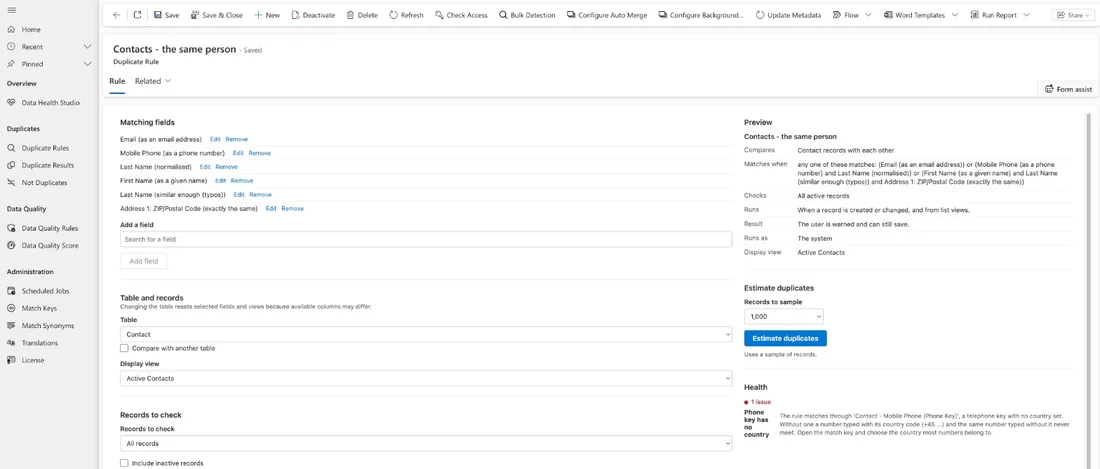 1Find and merge duplicates
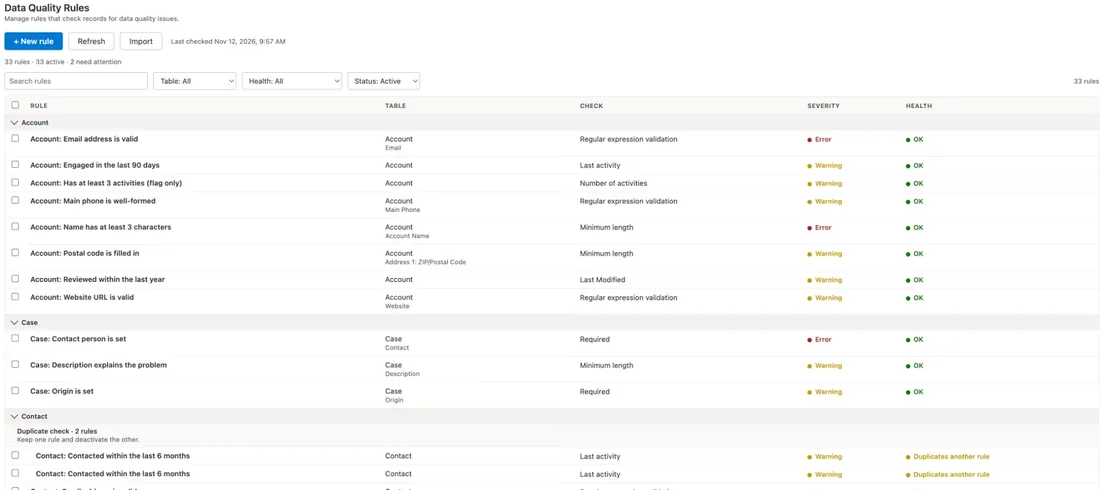 2Enforce data quality rules
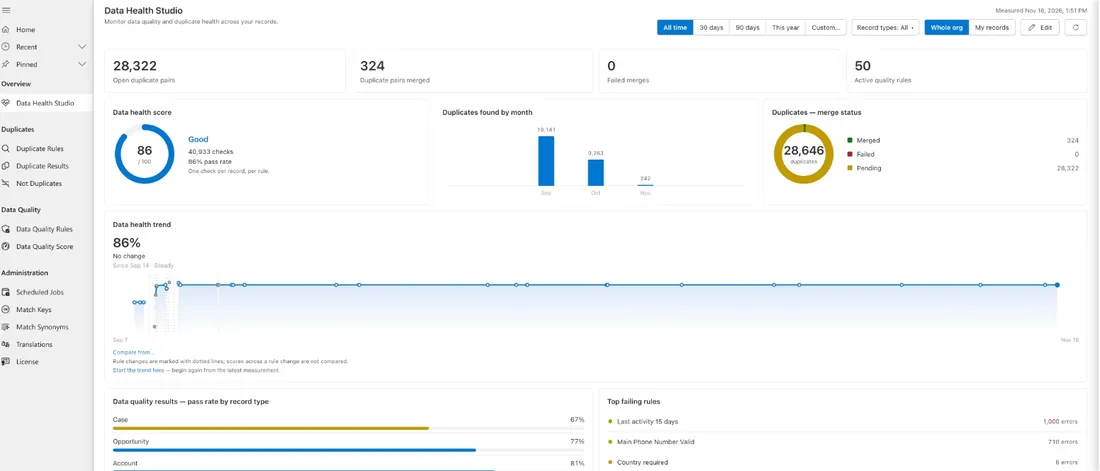 3Measure data health
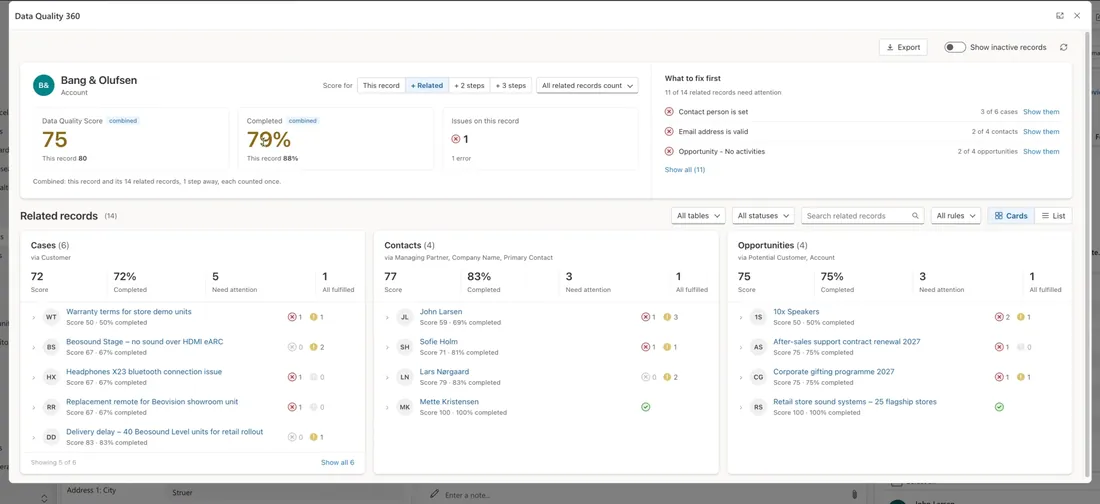 4See the whole customer
Inside the app
Introducing the Data Quality App for Dynamics 365
One solution for the whole data quality job: find and merge duplicates, enforce rules at the point of entry, and measure your data health over time, all inside your own Dynamics 365. Microsoft Certified Software for Business Applications, available on Microsoft Marketplace.
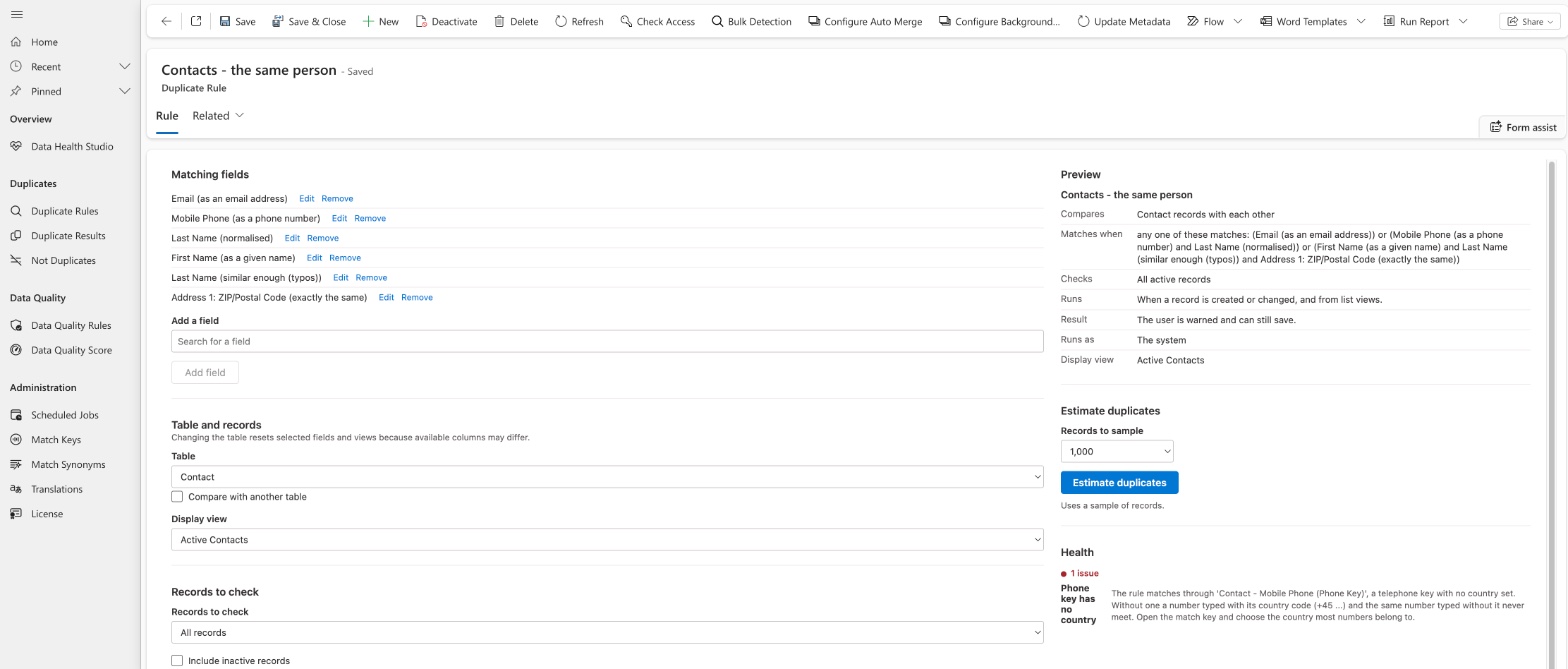
Detection rules that fit how you work
Define exactly what counts as a duplicate: exact, fuzzy and phonetic matching on any field and any table, standard or custom. Rules run while users work and across existing data in the background, and prevention at the point of entry keeps cleaned tables clean.
- Fuzzy and phonetic matching
- Match scores out of 100
- Stops duplicates on save

Bulk merge at enterprise scale
Run detection across millions of records in the background and merge duplicates in bulk with master-record rules you configure. Track progress live: records processed, duplicates found and every merge logged. And if a merge was wrong, an admin can undo it.
- Millions of records
- Master-record rules
- Undo any merge

Manual merge with full control
Merge records side by side. Pick the primary record, choose the winning value for every field with conflicts highlighted, and set merged records to the status you choose. Nothing merges until you approve it.
- Field-by-field choice
- Any table
- Related records kept
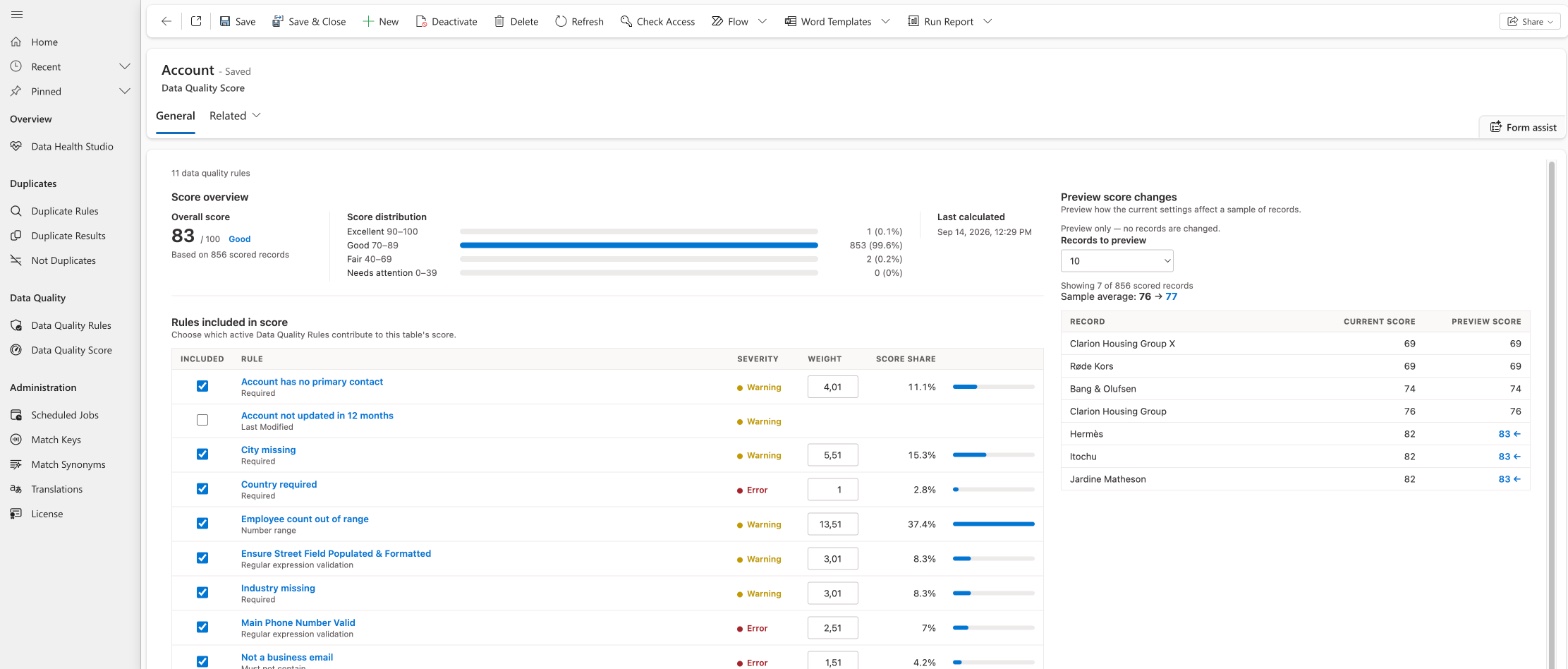
Score every record, weight every rule
Every record gets a data quality score from the rules you enable and the weight you give each one. See the score distribution across the whole table and preview how rule changes affect scores before you commit.
- 22 rule types
- Warn or block on save
- Preview before you commit

Guidance directly on the record
The Data Quality Dashboard sits on the record, on any table. Open an account, a contact or one of your own tables and users see errors, warnings and completed checks right away, and fix data on the spot.
- On every record
- Standard and custom tables
- Fix it on the spot
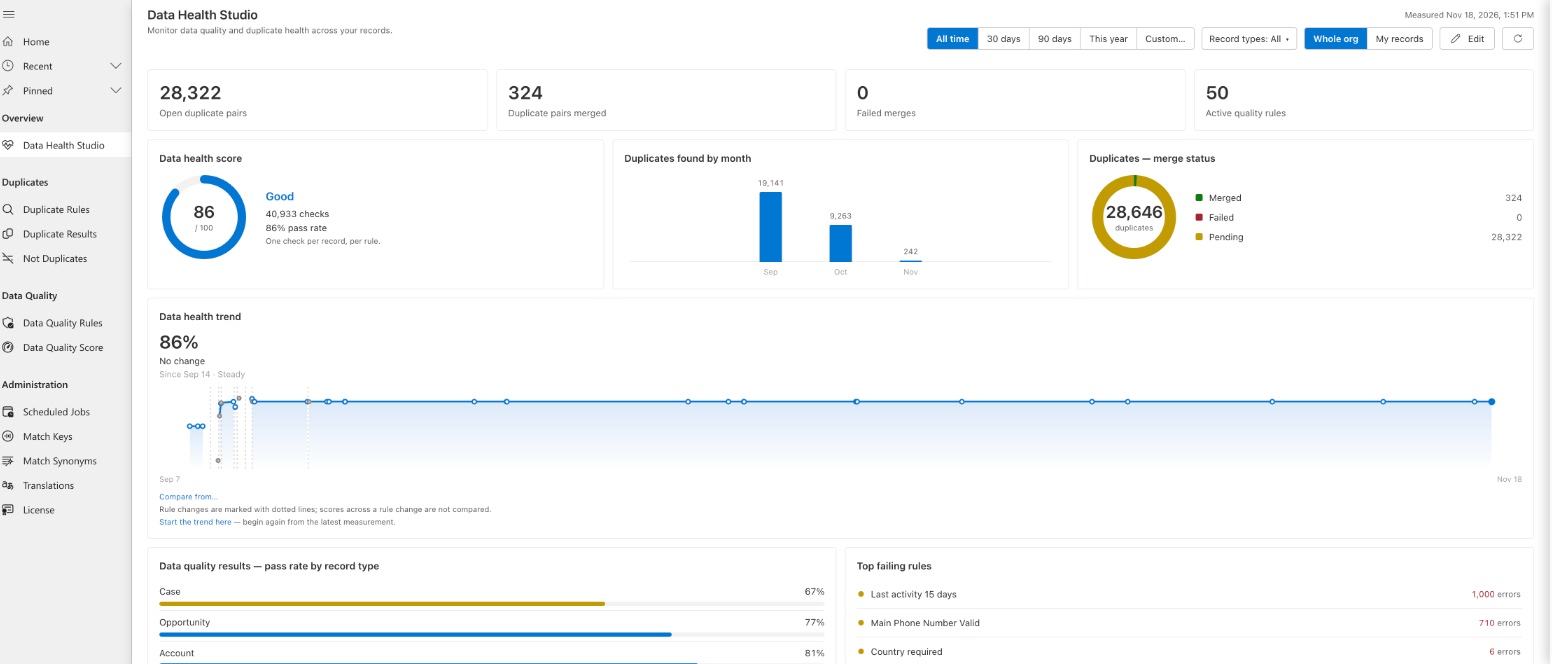
Measure data quality over time
Data Health Studio shows the state of your data today and how it develops over 30 and 90 days: duplicate rates, rule compliance and completeness per table, on one dashboard customised to your organisation.
- Health score per table
- 30 and 90 day trends
- Your own layout
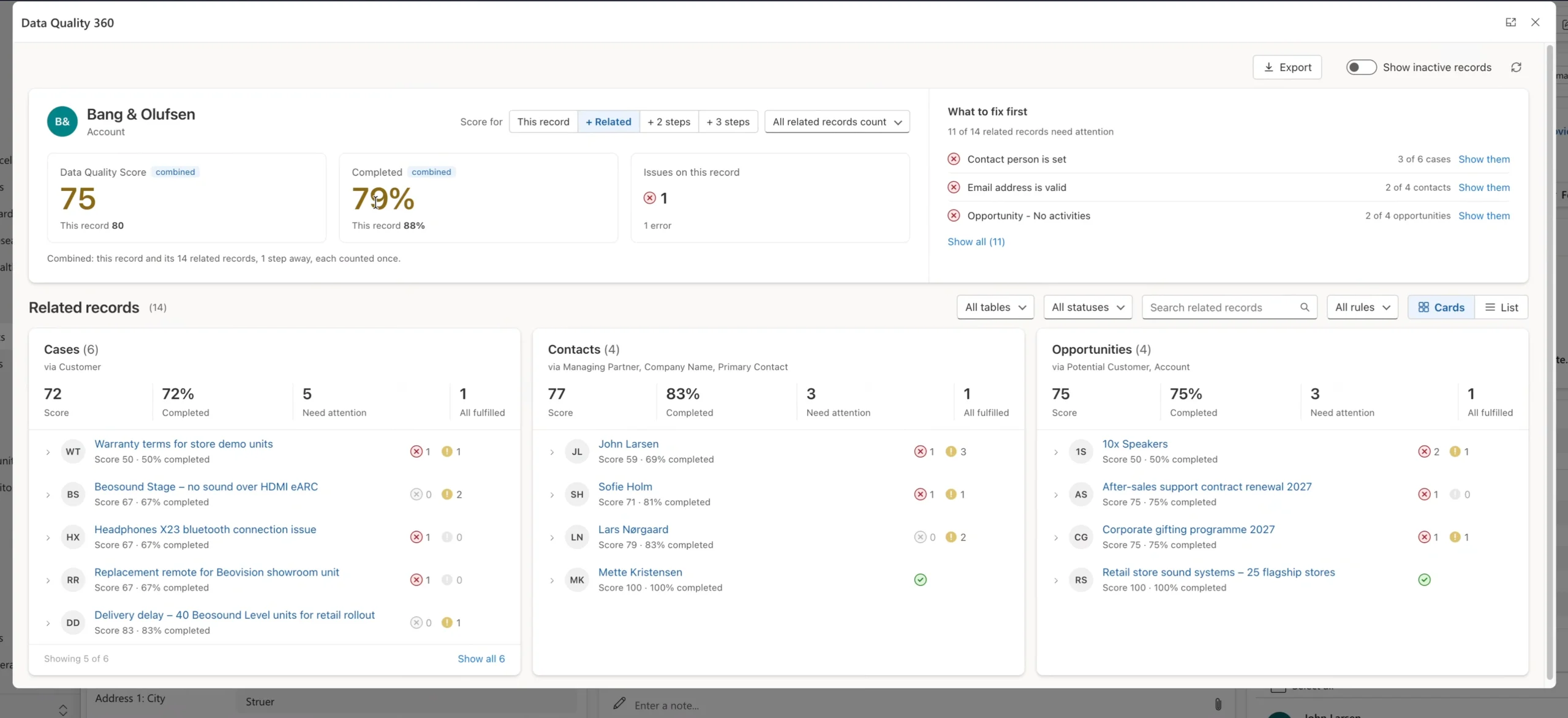
Data quality for the whole customer
Data Quality 360 scores an account together with its related contacts, cases and opportunities, so you see the data quality of the whole customer in one view. What to fix first ranks the problems, and the fix list exports to Excel or PDF.
- Account plus related records
- What to fix first
- Export to Excel or PDF
What clean data is worth
Bad data rarely shows up as one big failure. It shows up in small ways every day, until nobody trusts the CRM. The Data Quality App keeps your Dynamics 365 records accurate, complete and reliable, so reporting, automation and every team work from the same truth.
average cost per organisation, per year, according to Gartner.
It rarely shows up as one line item. It hides in rework, missed follow-ups and decisions made on the wrong numbers.
And that is just the deduplication. Rules on every table, a Data Quality Score on every record, and Data Health Studio to show the trend.
See the complete data quality solutionUsed by businesses around the world
Organisations across banking, manufacturing, education, retail and the public sector run their Dynamics 365 data through Techdio. From IKEA and Armanino to Vestas and Boehringer Ingelheim, they share one standard: customer data that is clean, complete and ready to build on. Read our customer stories to see the results.

Security
Your data stays in your tenant
The Data Quality App is a native Dynamics 365 solution. Rules, matching, merging and scores all run inside your own environment, so your customer data never passes through Techdio.
Runs in your environment
Installed from Microsoft Marketplace into your own Dynamics 365 and Dataverse. Nothing is copied out.
Background service on your side
Run it as a Power Automate heartbeat flow, in your own Azure or on your own server. Techdio hosts nothing that touches your data.
Dataverse security roles
Six security roles decide who can merge, run bulk jobs, change rules or use the MCP gateway for AI agents.
Offline licence activation
For locked-down environments, the licence can be activated without the app ever contacting Techdio.
Read the full customer stories
Hover or tap a story to open it.
 IKEARetail
IKEA: 2 Million Records Deduplicated in 16 Hours
More than 2 million records deduplicated in a single Dynamics 365 environment, with the full merge completed in 16 hours.Read the story → ArmaninoAccounting and consulting
Armanino: Trusted Client Data at Scale
Phonetic matching, multi-record merge and data quality rules across Dynamics 365 for a Top 20 US CPA and consulting firm.Read the story → 3 (Hi3G)Telecom
3 (Hi3G): Clean Customer Data in Telecom
Rules on all sales tables, duplicates cleared, and data quality followed in dashboards and Power BI.Read the story → VestasEnergy
Vestas: Data Cleanup in Days, Not Months
Automated duplicate detection replaced a two-month manual merge project and was done in hours.Read the story → Boehringer IngelheimLife sciences
Boehringer Ingelheim: Clean Data Before Going Online
CRM data cleansed and standardised with the Data Quality App before the move to Dynamics 365 Online.Read the story → Wonderful CopenhagenTourism and public sector
Wonderful Copenhagen: GDPR-Ready Customer Data
Duplicates cleared and data quality rules enforced, so customer data met GDPR requirements.Read the story →Latest guides
Step-by-step guides for keeping Dynamics 365 data clean, written by the team that builds the Data Quality App.
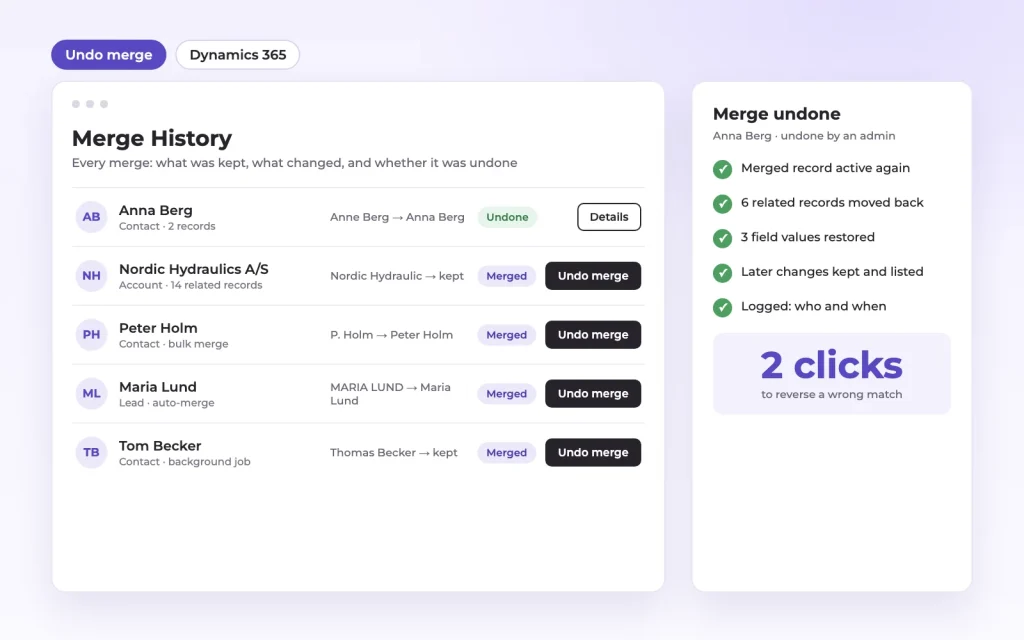
Undo a Merge in Dynamics 365, and 5 More Things Most Data Quality Tools Can’t Do
Built-in Dynamics 365 merges cannot be undone. Here is how the Data Quality App undoes merges, and five more things that are rare among Dynamics 365 data quality tools.
Read the guide →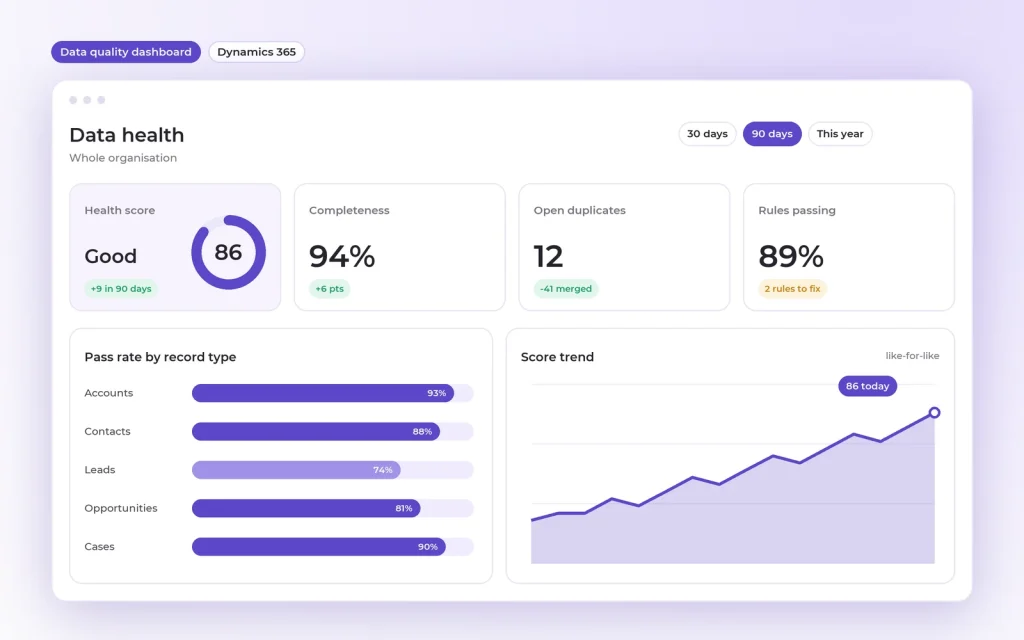
Data Quality Dashboard for Dynamics 365: What to Track and How
The metrics a Dynamics 365 data quality dashboard should track, the two levels it needs (record and organisation), and the ways to build one.
Read the guide →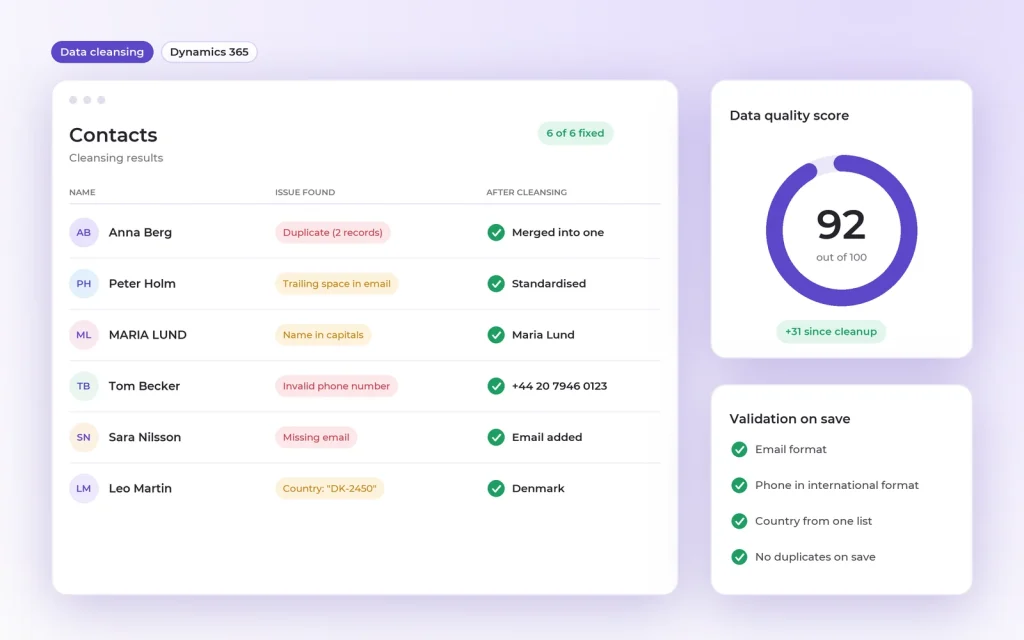
How to Cleanse Data in Dynamics 365: A Step-by-Step Guide
A practical, step-by-step guide to cleansing Dynamics 365 data: what to fix, which built-in tools help, where they stop, and how to keep the data clean afterwards.
Read the guide →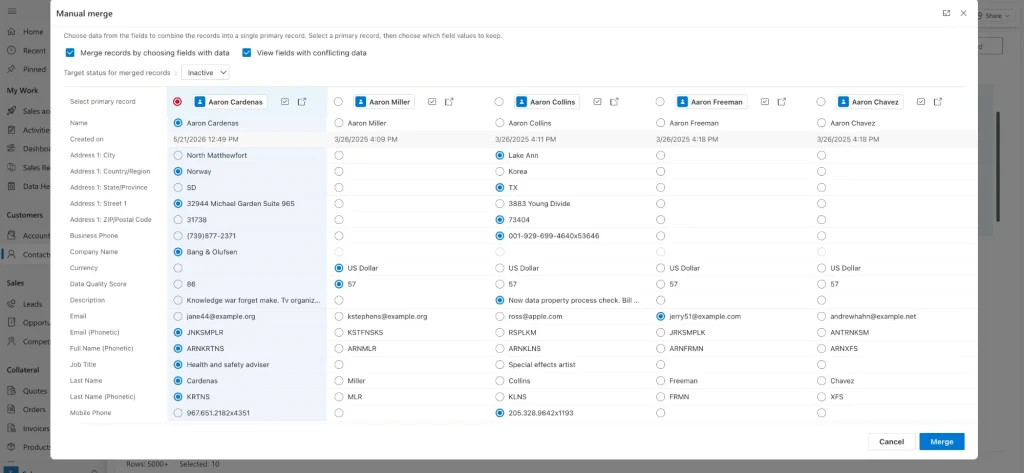
How to Merge Custom Table Records in Dynamics 365 (Dataverse)
Why Dynamics 365 cannot merge custom table records, and three ways to merge them safely with their related records.
Read the guide →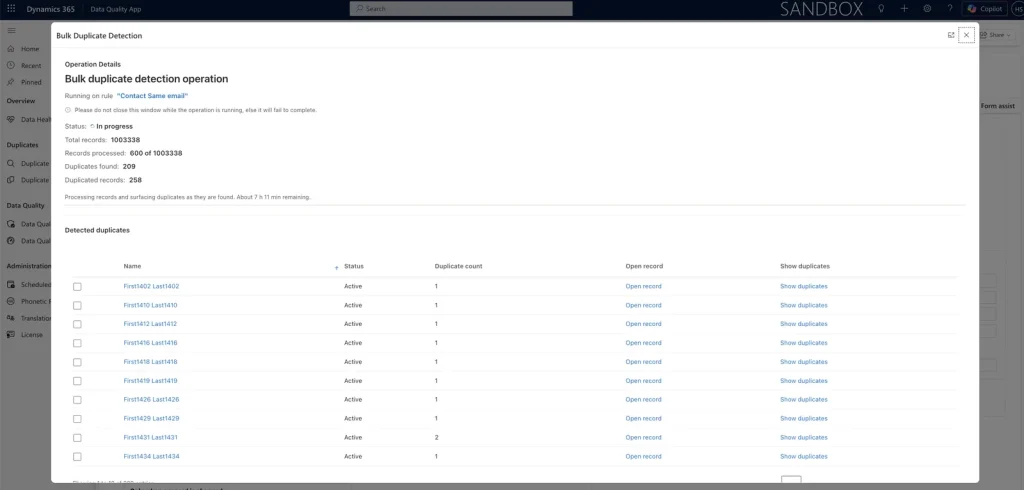
How to Prevent Duplicate Records in Dynamics 365 (Warn or Block)
Where duplicates come from in Dynamics 365, what the platform prevents on its own, and how to warn or block duplicates for users, imports and integrations.
Read the guide →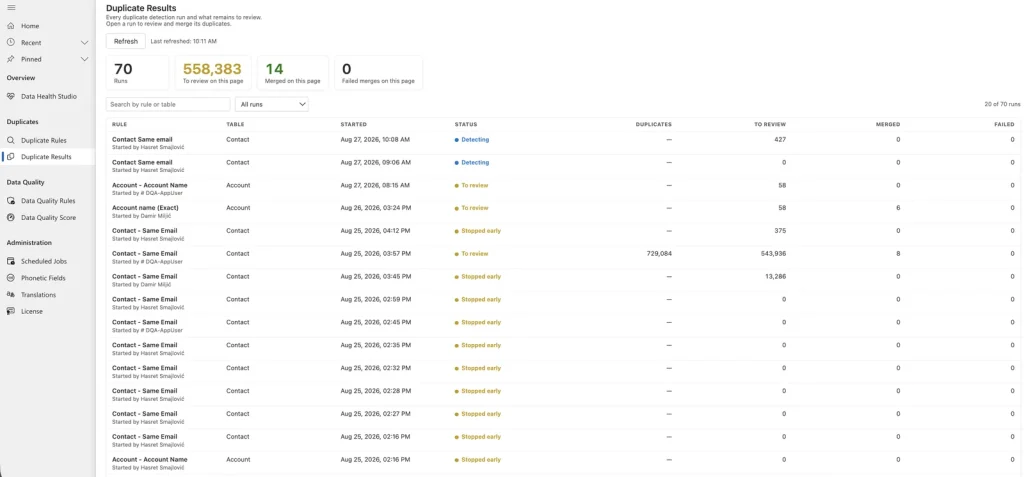
Fuzzy Matching in Dynamics 365: Find the Duplicates Exact Rules Miss
How fuzzy matching finds duplicates that exact Dynamics 365 rules miss, and how to use it safely with scores and thresholds.
Read the guide →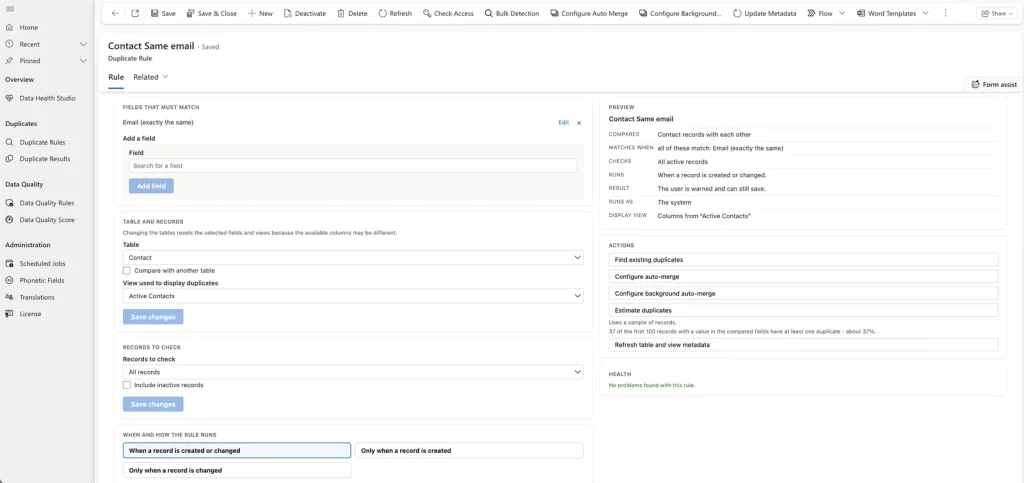
How to Set Up Duplicate Detection Rules in Dynamics 365 (Step by Step)
How to set up duplicate detection rules in Dynamics 365 step by step, with rule examples and the limits of native duplicate detection.
Read the guide →Stop Duplicate Leads from Marketing Forms in Dynamics 365 Customer Insights – Journeys
Customer Insights – Journeys lead forms create a new lead for every submission by default. Why marketing forms create duplicate leads and contacts, six settings that fix most of it,...
Read the guide →Frequently asked questions
Short answers to what CRM, IT and data teams ask before they install the Data Quality App.
Talk to the team that builds the app. We will show it on your own data.
01Is the Data Quality App Microsoft certified?
Yes. The Data Quality App is Microsoft Certified Software for Business Applications, available on Microsoft Marketplace, and runs natively inside your Dynamics 365 environment.
02Does it work on custom tables?
Yes. Duplicate rules, data quality rules, the Data Quality Dashboard and scoring work on any entity in Dynamics 365 and Power Apps, standard or custom.
03Are there limits on data volume or entities?
No. One subscription opens the full solution: process unlimited data, on every entity in Dynamics 365 and Dataverse, standard or custom. All features are included from day one, so there is nothing to unlock later.
04How does the free trial work?
The trial gives you the full solution free for 15 days, no subscription needed. That is long enough to scan your whole database and get a complete duplicate report. During the trial, merges run 10 records at a time.
05Does our data leave our environment?
No. Everything runs inside your own Dynamics 365 and Dataverse environment. Your data never leaves your tenant.
06Can duplicates be prevented completely?
Yes, for the rules you set to block. A blocking rule stops the save for users, imports and integrations, so the duplicate is never created. Specific service accounts can be allowed to create duplicates that are merged automatically afterwards by your own master-record rules.
Ready to improve the data in your Dynamics 365?
Try the Data Quality App free for 15 days on your own data: install it, create your first rule and see your real duplicate rate and data health score. No card, no licence key.
- No card, no licence key
- Runs inside your own tenant
- Unlimited users and records
What happens next
- Install from Microsoft MarketplaceA few minutes, in your own Dynamics 365 or Power Apps environment.
- Create your first ruleThe free 15-day trial starts by itself. We help you set it up if you like.
- See your data healthEvery duplicate with a match score, every record that breaks a rule, and your score in Data Health Studio.